Art by Daniela Sherer via Giphy
In this lesson
This lesson you'll learn to quickly review footage, trim clips and speed around the timeline! 🚗
➀ sequence settings
➁ timeline navigation
➂ icon view
➃ the source monitor
➄ freeform view
➅ timeline trimming
➆ assignment
Part 01
Start your project
You can't make a video in Premiere without creating a sequence, but you'll need to get past a scary settings window first. Don't worry — I'll make real simple.
Part 02
Timeline navigation
The secret to fast edits is moving around the timeline with speed! I'll show you how.
Part 03
Icon view
The secret to fast edits is moving around the timeline with speed! I'll show you how.
Part 04
The source monitor
This must-know panel lets you trim source footage up close and with audio.
Part 05
Freeform view
I don't love this trimming method so if you're in a rush, feel free to skip to the next video where I show my favorite way to trim clips.
PART 06
Timeline trimming
This is my all-time favorite way to trim clips because it's so dang fast.
Part 07
Assignment
Get details on what to tackle for your cinematic sequence before moving on to the next lesson.
Thumbnail art by Sussis via Giphy
What to do
Review the rest of your footage.
Trim clips of the highlights using the method you like most.
Add your best stuff to a sequence in the timeline panel.
Resources
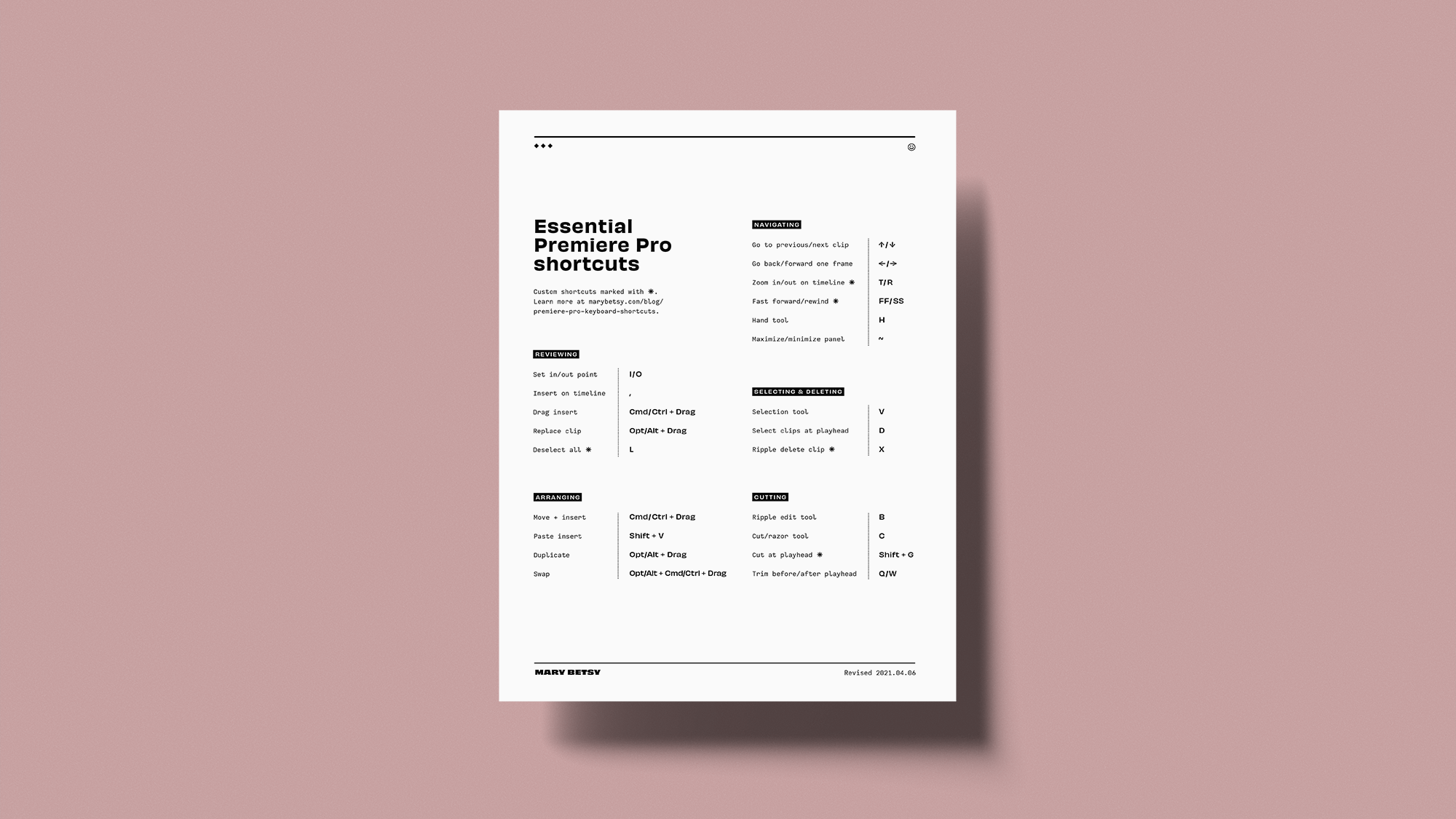
Essential shortcuts cheat sheet
My custom shortcut preset
Installation instructions
➊ Download the keyboard shortcuts preset file above for your device.
➋ Save the file in the right folder, which depends on whether you're signed in or out of Adobe Creative Cloud. (Confusing, we know.)
Signed in
Mac: Users/[user name]/Documents/Adobe/Premiere Pro/[version]/Profile-CreativeCloud-/Mac/
Windows: Users\[user name]\Documents\Adobe\Premiere Pro\[version]\Profile-CreativeCloud-\Win\
Signed out
Mac: Users/[user name]/Documents/Adobe/Premiere Pro/[version]/Profile-username/Mac/
Windows: Users\[user name]\Documents\Adobe\Premiere Pro\[version]\Profile-username\Win\
➌ Launch Premiere Pro.
➍ Go the Premiere Pro menu and select Keyboard Shortcuts.
➎ In the top left next to Keyboard Layout Preset, select the preset that you just downloaded from the dropdown menu.
Updated June 2020. Check Adobe for details & updates.

Frame rates lesson
Credits
Shortcuts rap song based on the song Money from the 2018 album Money performed by Cardi B, written by Belcalis Almanzar and Anthony White, produced by J. White Did It and released by Atlantic Records.